Pricefy plans differ in two ways: how much you can monitor, and which features you can use. This guide shows exactly what each plan includes — and what it doesn’t — so you can pick the right one.
The five Pricefy plans
There are five plans — Free, Starter, Pro, Business and Enterprise. Each one raises your limits and unlocks more features. You can compare them side by side inside the app: open My Account from your avatar, go to Billing, then click Change Plan.
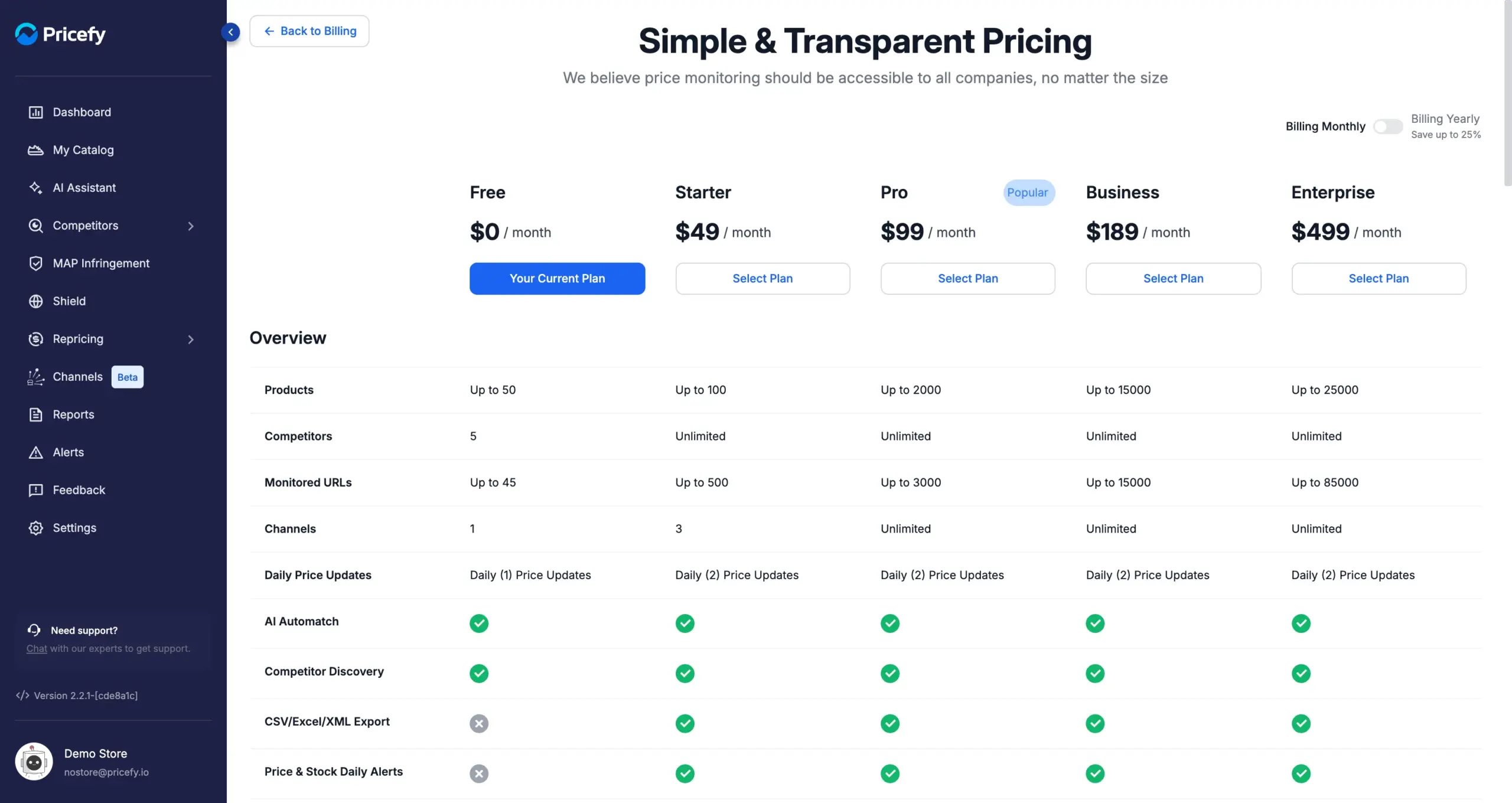
Switch Billing Yearly on to see the annual price of each plan. For current prices, see the Pricefy pricing page.
What every plan includes
Some things are the same on every plan, including Free:
- Competitor price and stock monitoring — the core of Pricefy.
- AI Automatch — Pricefy matches your products to competitor pages for you. See How the auto-match works.
- AI Competitor Discovery — Pricefy finds new competitors for your products. See Find competitors with AI Discovery.
- AI Assistant — a monthly allowance of messages on every plan, which you can extend with an add-on.
- All store platforms and integrations — Shopify, WooCommerce, BigCommerce, Magento, PrestaShop and data feeds.
- The Pricefy API and the Chrome extension.
- Free onboarding and setup, and no credit card to start.
Limits by plan
These are the amounts each plan allows.
| Plan | Free | Starter | Pro | Business | Enterprise |
|---|---|---|---|---|---|
| Products (SKUs) | 50 | 100 | 2,000 | 15,000 | 25,000 |
| Competitors | 5 | Unlimited | Unlimited | Unlimited | Unlimited |
| Monitored URLs | 45 | 500 | 3,000 | 15,000 | 85,000 |
| Channels | 1 | 3 | Unlimited | Unlimited | Unlimited |
| Linked accounts | — | 1 | 3 | 5 | 50 |
| Extra alert & report recipients | — | — | 3 | 5 | 10 |
| Price updates | Daily (1) | Daily (2) | Daily (2) | Daily (2) | Daily (2) |
| AI Automatch requests | 3 | 3 | 3 | 3 | 3 |
| AI Discovery requests per day | 20 | 20 | 20 | 20 | 20 |
A few of these are worth explaining:
- Products — every product you import counts, whether or not it has competitors attached.
- Monitored URLs — the individual competitor product pages Pricefy watches. One product tracked at four competitors uses four monitored URLs, so this is usually the limit you reach first.
- AI Automatch requests — a rolling 30-day allowance, the same on every plan. Matches found through Google results don’t use it up.
- Extra alert & report recipients — how many colleagues you can add alongside yourself as recipients of alerts, reports and exports.
- Price updates — how often Pricefy refreshes competitor prices. See How often does Pricefy update competitor prices?
What each plan unlocks
Beyond the amounts, plans differ in the features they switch on.
| Feature | Free | Starter | Pro | Business | Enterprise |
|---|---|---|---|---|---|
| AI Automatch | ✓ | ✓ | ✓ | ✓ | ✓ |
| AI Competitor Discovery | ✓ | ✓ | ✓ | ✓ | ✓ |
| AI Assistant | ✓ | ✓ | ✓ | ✓ | ✓ |
| CSV/Excel/XML export | — | ✓ | ✓ | ✓ | ✓ |
| Easy catalog import | — | ✓ | ✓ | ✓ | ✓ |
| Price & stock daily alerts | — | ✓ | ✓ | ✓ | ✓ |
| Linked accounts | — | ✓ | ✓ | ✓ | ✓ |
| Dynamic Repricing | — | — | ✓ | ✓ | ✓ |
| Daily reports | — | — | ✓ | ✓ | ✓ |
| Public URL (Web File) delivery | — | — | ✓ | ✓ | ✓ |
| Autopilot Repricing | — | — | — | ✓ | ✓ |
| Instant alerts | — | — | — | ✓ | ✓ |
| Hourly reports | — | — | — | ✓ | ✓ |
| MAP/MSRP monitoring | — | — | — | ✓ | ✓ |
| Competitor Contact Info | — | — | — | ✓ | ✓ |
| Dedicated support | — | — | — | — | ✓ |
In short: Starter adds exports and daily alerts, Pro adds Dynamic Repricing and scheduled reports, Business adds Autopilot repricing, instant alerts and MAP/MSRP monitoring, and Enterprise adds the largest capacity plus dedicated support.
See your own plan’s limits
Your plan’s exact numbers — and how much you’ve used — are always in the app. Open My Account from your avatar, then the Usage tab.
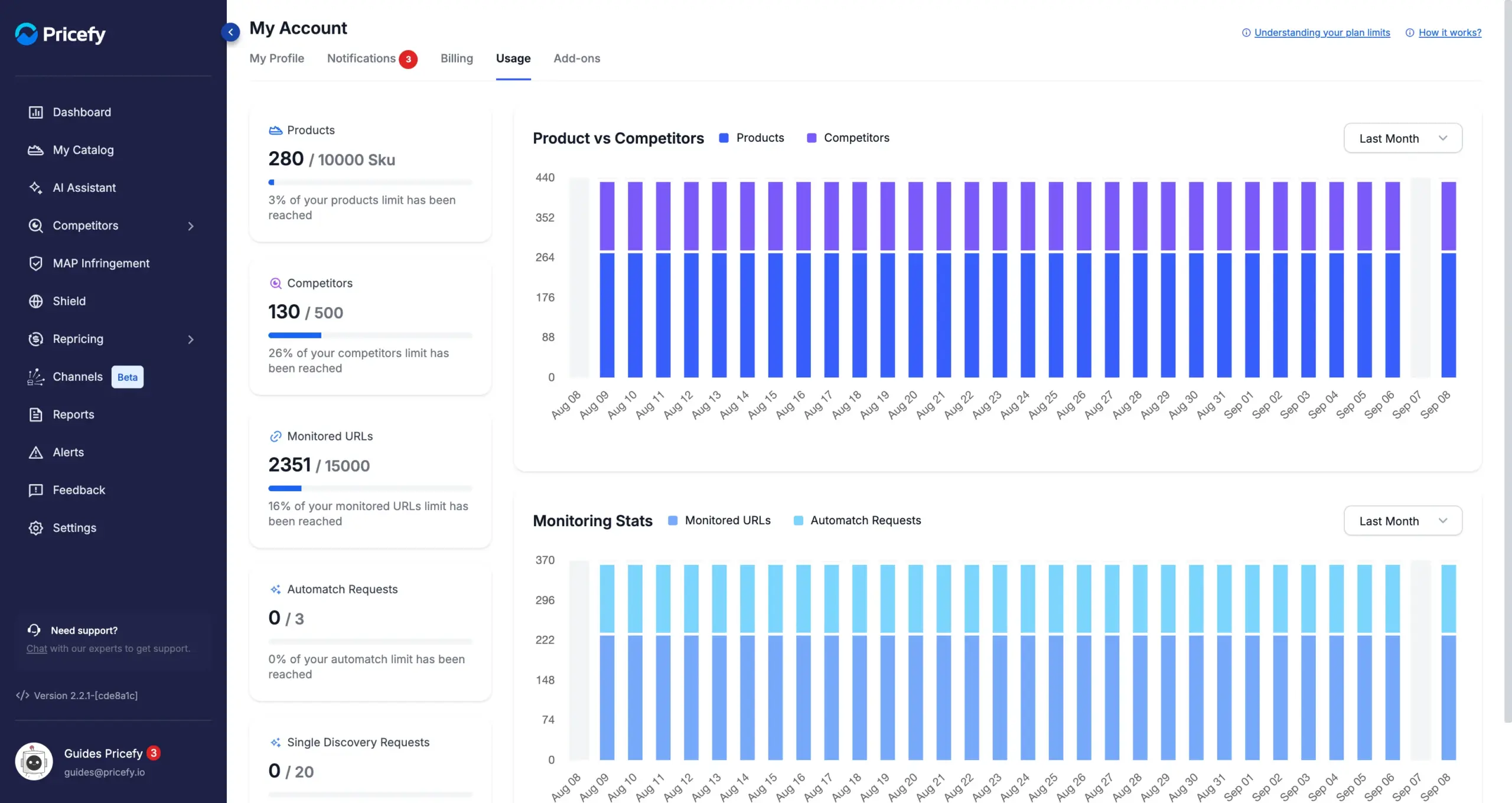
Each card shows what you’ve used out of your limit, with the percentage reached. For more on this page, see Usage: track your plan limits.
When a feature isn’t in your plan
Every section stays visible in the menu on every plan, so you can always see what Pricefy offers. When you use a feature your plan doesn’t include, Pricefy tells you which plan unlocks it and offers to upgrade — for example “Repricing feature requires Pro plan!”.
- Rules are never lost. An alert, report or repricing rule of a type your plan doesn’t cover can still be saved — it simply won’t run, and it starts running by itself once you upgrade.
- Some data is shown partly hidden rather than removed. Below Business, discovered competitor contacts appear masked so you can see what’s there before unlocking it.
When you reach a limit
Once you hit a limit you can’t add more of that item until you free up space or raise the limit. You have two ways to get more:
- Add an add-on to raise one limit without changing plan — see Add-ons: extend your Pricefy plan.
- Upgrade your plan to raise everything at once — see Billing: your plan, payments and invoices.
Good to know
- You can change plan at any time. Upgrading charges the prorated difference straight away; downgrading applies the remaining credit to your next invoice.
- Before you downgrade, bring your account within the new limits yourself. Products and competitors above the new plan’s allowance are removed automatically, and you don’t choose which ones go.
- Linked accounts are not the same as team members. Linked accounts let you switch between separate Pricefy accounts; inviting colleagues to your own account isn’t limited by plan.
- Limits are shared. Sub-accounts use the master account’s plan and its limits.
- Numbers can change. Your Usage page always reflects what applies to your account.